
Build structure
Organize tasks, notes, and events.
Arrange work in pages and folders, nest related items, and lock finished pages when they need to stay unchanged.
Start for free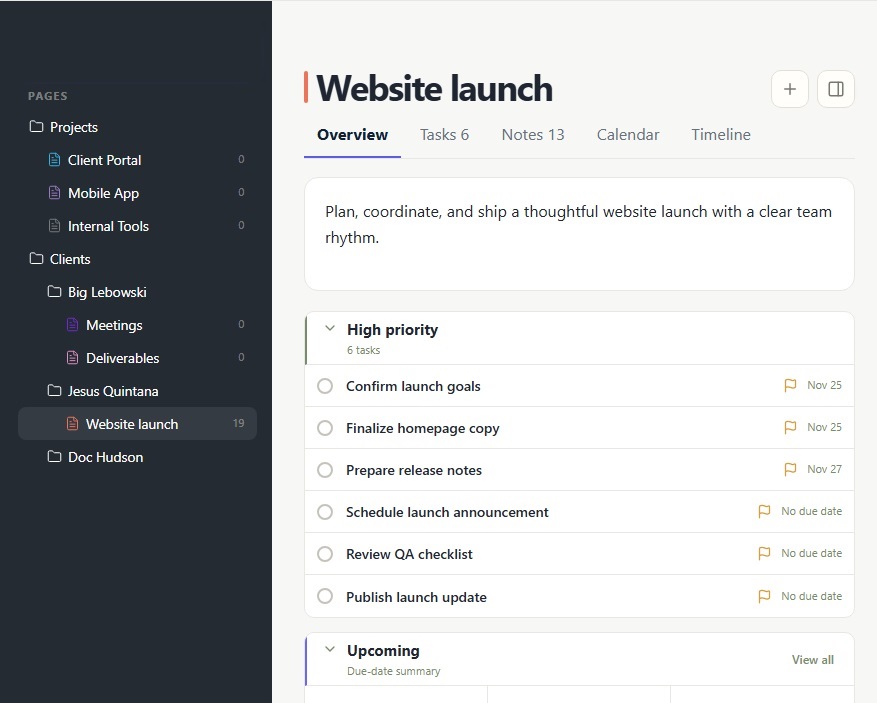
Pages
Bring tasks and notes together in dedicated spaces for projects or areas of work. Switch between overview, task lists, notes, calendar, and timeline views to see everything from different perspectives.
Folders
Organize your workspace with folders and subfolders. Group related pages into a clear hierarchy, making it easy to manage projects and navigate between different areas of work.
Tasks and Notes
Use tasks to manage what needs to get done and notes to capture ideas, knowledge, and supporting information. Bring both together within the same page, keeping everything related to your work in one place.
Calendar
Every page includes its own calendar view, bringing scheduled tasks and important dates together. See what's planned, track upcoming deadlines, and navigate your work by date.
Timeline
Explore past events in chronological order. Keep track of completed activities, important milestones, and key moments to see how your work has evolved over time.
Favorites and locked pages
Keep frequent pages close and lock finished pages so they stay unchanged.